How Much Claude Code Costs for an Engineering Team
What a 30-person engineering team pays for Claude Code on seats, the API and Enterprise, with measured costs per model and per session, and where to set spend limits.
According to Anthropic, engineering teams spend $150 to $250 per developer per month on average for Claude Code. However, that's not necessarily how much you'll actually pay, because there are two types of pricing: API rates and subscriptions.
On subscriptions, you get more usage than you would get paying the same amount in API-rate pricing.
For example, I have a personal $200 Claude Ultra subscription. Last month, this subscription allowed me to use $4,988 worth of tokens at API pricing. You get to see this by running /usage in an active Claude Code session. Subscriptions are heavily subsidized as a customer acquisition and market-share strategy.
Intuitively, you could budget $200 per engineer, because why wouldn't you use these subsidies for your own company. However, consumer plans aren't designed for commercial use, so Anthropic, OpenAI and other labs have introduced special subscriptions for engineering teams. These have a predictable monthly price, but are subject to usage limits (based on token usage, not dollar amounts). Engineers who hit these limits either stop until the limit resets or continue at API pricing, so these plans are harder to budget for than they seem.
In this article, let's look at some examples of which pricing models work in which scenarios, and how companies can effectively budget for AI usage. I'll also introduce you to Emdash, a coding agent orchestrator that gives engineering teams one place to see and control what each developer spends across Claude Code, Codex, and other agents.
How much does Claude Code cost per developer?
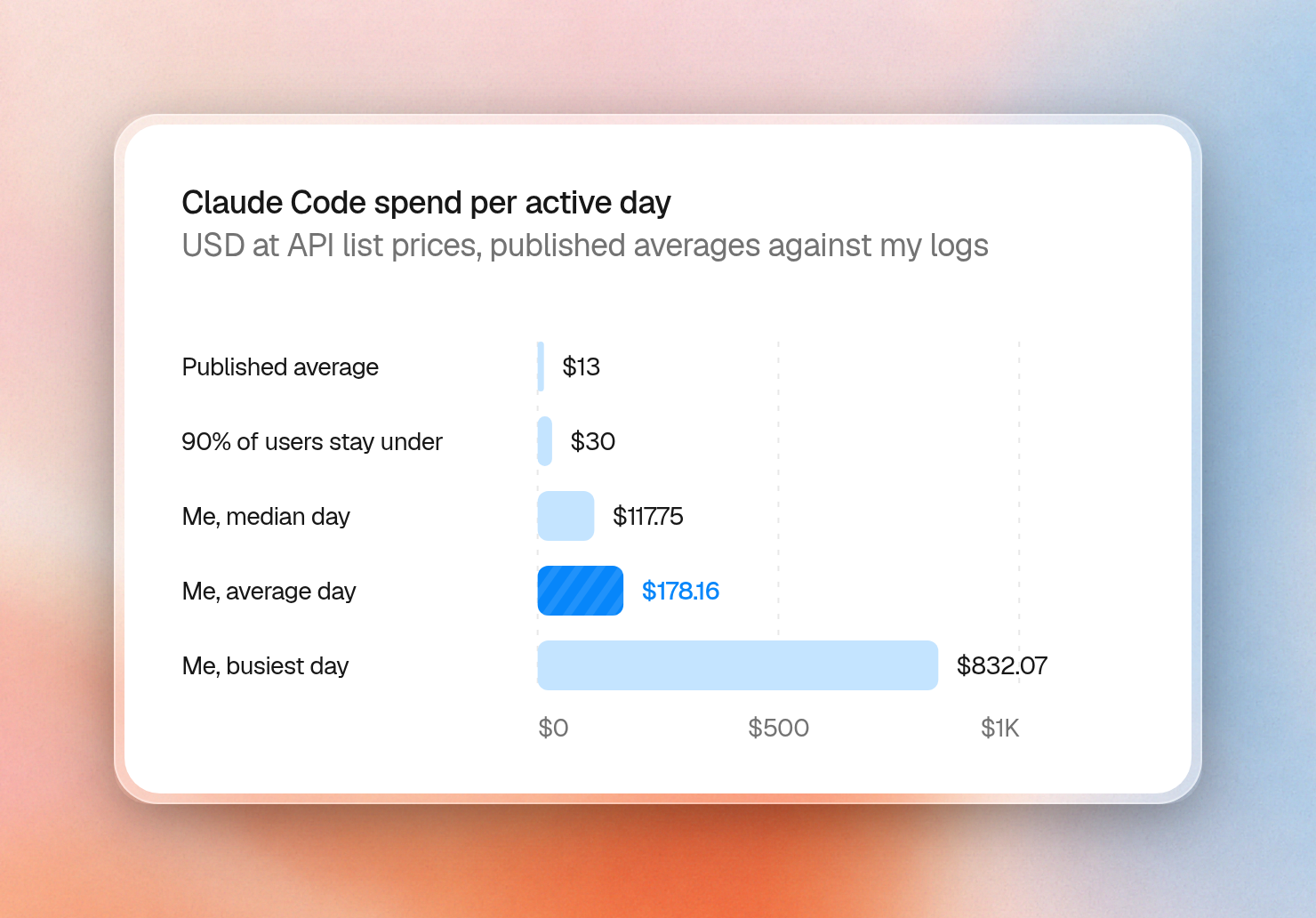
Claude Code costs about $13 per developer per active day and $150 to $250 per developer per month on average across enterprise deployments. Individual days can cost far more, but the large majority of users stay under $30 per active day.
To give you an idea of prices at heavy usage, I recorded some of my own usage statistics. Some stats about my last month of using Claude Code at Anthropic's list prices:
- $4,988 in total
- $178 on an average day
- $832 on the busiest day
- 278 sessions, with a median cost of $2.74 and a largest session of $1,547
- 43% of all spend in the five largest sessions
What 30 engineers would cost per month
You can pay for Claude Code through individual subscriptions, seats on a Team plan, tokens through the Claude Console, or an Enterprise plan that charges for both seats and tokens.
At current prices, cost for a team of 30 engineers would look like this:
| Plan | Cost | 30 engineers/mo | Usage limits |
|---|---|---|---|
| Personal (Pro, Max or Ultra, one per person) | $20, $100 or $200 a month | $600, $3,000 or $6,000 | Work stops until the window resets, unless usage credits are on |
| Team, Standard seats | $20 a seat billed annually, $25 monthly | $600 | Work stops until the window resets, unless usage credits are on |
| Team, Premium seats | $100 a seat billed annually, $125 monthly | $3,000 | Work stops until the window resets, unless usage credits are on |
| Claude Console (API) | Tokens at list price, no seat fee | $4,500 to $7,500 at average use | Billing continues until a spend limit stops it |
| Enterprise | $20 a seat billed annually, plus all usage at API rates | $5,100 to $8,100 at average use | Billing continues until a spend limit stops it |
Team and Enterprise seat prices on claude.com/pricing, 6 November 2026
On their own, subscriptions and API pricing each have a trade-off.
With team plans, you'll have usage limits, but get predictable pricing. API pricing is more expensive and less predictable, but you get unlimited usage.
You don't necessarily need to choose either/or, though. If your team is small enough for the Team plan (up to 150 people), use Team seats with usage credits on. Each engineer can first use their subsidized seat allowance, then continue at API rates once they reach usage limits (e.g. the 5-hour limit). This way, the first part of their work will be subsidized, and you can limit extra usage through spend controls. For engineers with average or heavier usage, this costs less than pure API pricing.
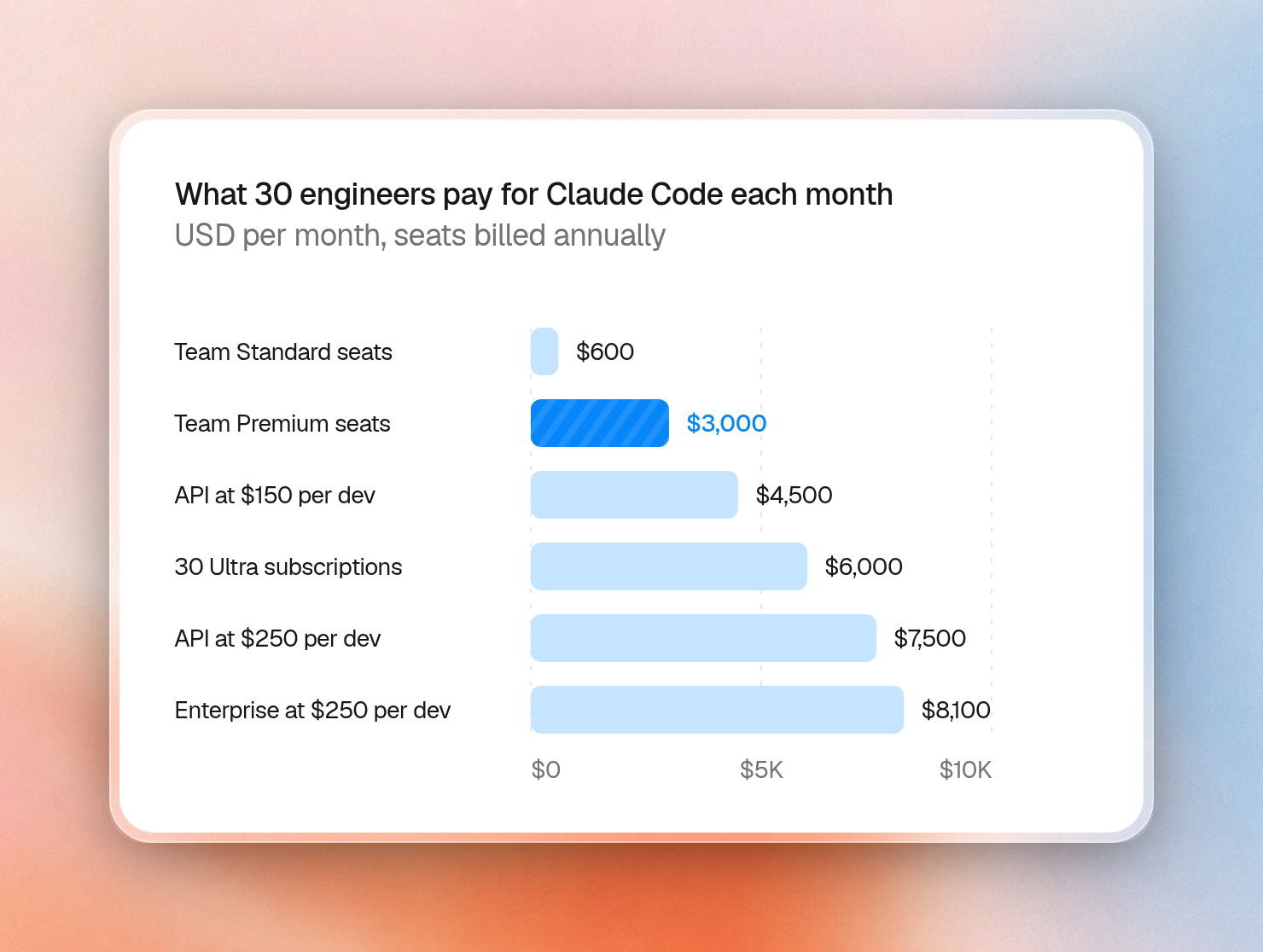
Premium seats break even early. At average daily use ($13/day), they match API costs after about 8 active days a month. Premium seats have 5x the usage of Standard seats, and you can use both types on a single plan. Combined with usage credits, they’re what I’d recommend for company usage. The 150-seat limit is the point where you’d move to Enterprise and lose the subsidy.
As a side note, Anthropic earns far more from API pricing than from subscriptions: its IPO filing shows $13.1 billion of usage-based revenue in the first half of 2026, 80% of the total, against $3.2 billion from subscriptions.
Can a company use Pro, Max or Ultra subscriptions?
Pro, Max and Ultra use consumer terms, but there are different consumer terms for EEA and Switzerland, and those say "Non-commercial use only". The other version of consumer terms we read doesn't say that. Your lawyer can clarify. Or use the Team plan instead.
| Pro, Max, Ultra | Team, Enterprise, API | |
|---|---|---|
| Terms | Consumer | Commercial |
| Can people share access? | No | Yes, with a company API key |
| Trains on your code? | Only if that person's setting is on | No, by default |
| How long your data is kept | 5 years if training is on, 30 days if off | 30 days |
| Data processing agreement? | No | Yes |
| Company admin controls and spend limits? | No | Yes |
Personal subscriptions aren’t designed for company use. If each engineer uses their own subscription, it’s also hard to enforce company policies. For organizational use, you’ll likely want admin controls, spend limits, or a list of approved MCP servers.
Anthropic’s Team and Enterprise plans cover much of this for Claude Code. But most engineering teams don’t use just one coding agent. Some engineers prefer Codex, others want to try open-source models for cheaper tasks.
Each provider then comes with its own admin console, its own spend limits and its own reports. I'll cover a better way to handle this at the end of this article.
What one task costs on each model
I evaluated Claude Code on Hono, an open source TypeScript web framework of about 83,000 lines of code. I asked all four current models to perform each of the following tasks twice, at the default effort:
- Bug fix: I intentionally broke Hono’s handling of a query key with no value, described the problem, and asked Claude Code to fix the bug and write a regression test.
- Feature: we asked Claude Code to add a feature to the CORS middleware, including tests.
These are very straightforward tasks, and they can give us an idea of expected cost for a simple bug fix:
| Model | Input / output per million tokens | Cache read per million tokens | Bug fix | Feature |
|---|---|---|---|---|
| Haiku 5.5 | $0.10 / $0.50 | $0.01 | $0.01 | $0.01 |
| Sonnet 5.5 | $2 / $10 | $0.10 | $0.08 | $0.10 |
| Opus 5.5 | $4 / $20 | $0.20 | $0.15 | $0.20 |
| Fable 5.1 | $10 / $50 | $0.25 | $0.61 | $0.64 |
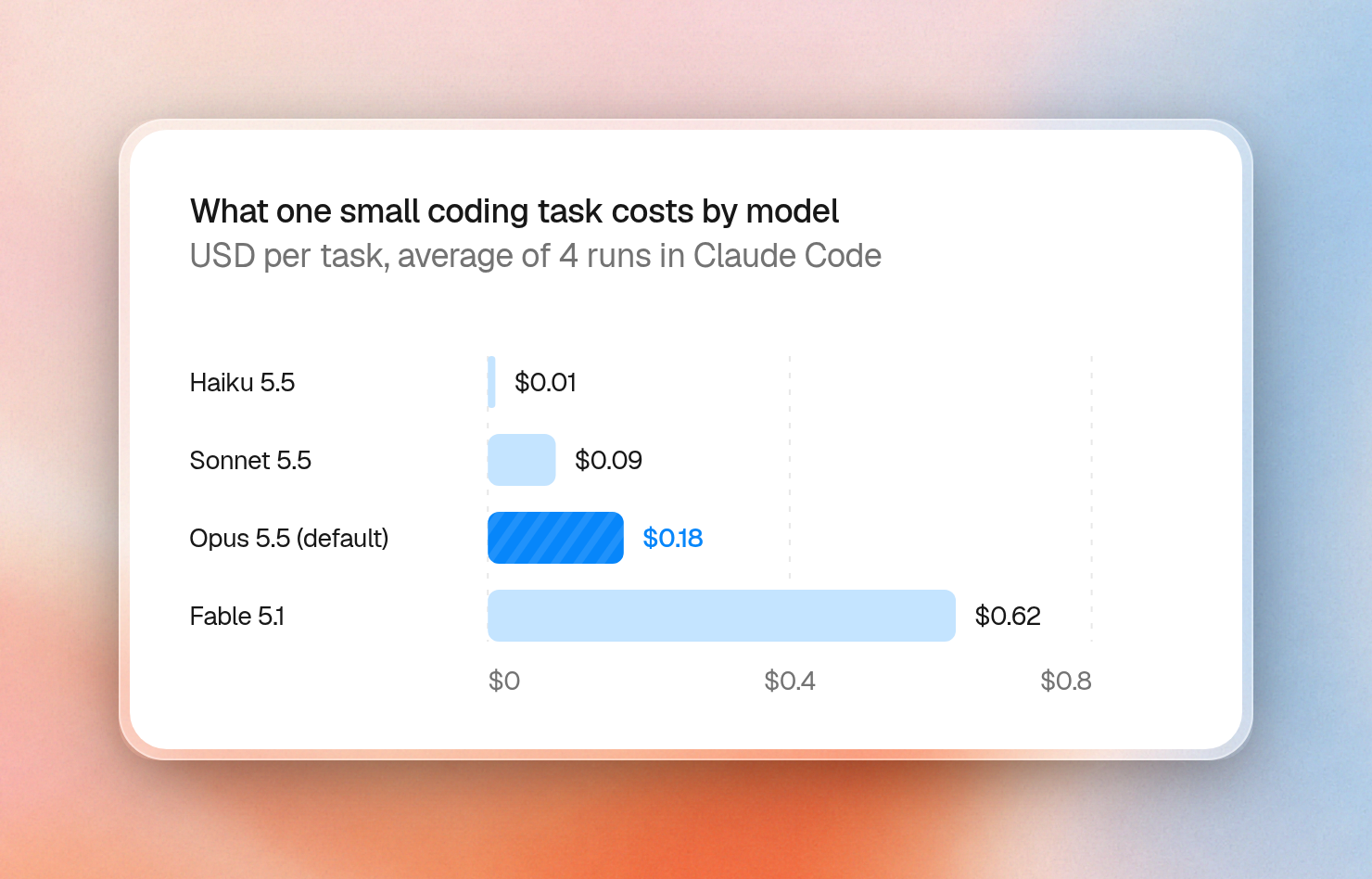
This was a set of short tasks, so the prompts were relatively small, making Haiku 5.5 much, much less expensive than Fable. (Though note that Haiku becomes five times as expensive when prompts exceed 100,000 tokens; cache reads contribute to the token count, so a longer session with Haiku won't retain as much of a discount.)
Opus was roughly twice as expensive as Sonnet. Fable (which defaults to high effort, unlike the other three) was about 3.5 times more expensive than Opus.
For short tasks like this, the cost isn't high, regardless of model. Doing 20 tasks like this in a day would have cost about $3.50 on Opus, which is well below the $13 average.
You can run the same check on your own tasks, because Claude Code reports the cost of every run:
claude -p "Where does Hono define its default router? Answer in one sentence." \
  --model sonnet --output-format json \
  | jq '{cost: .total_cost_usd, turns: .num_turns, cache_read: .usage.cache_read_input_tokens, cache_write: .usage.cache_creation_input_tokens, output: .usage.output_tokens}'
{
"cost": 0.018204599999999998,
"turns": 2,
"cache_read": 28366,
"cache_write": 5580,
"output": 141
}This can be useful to get a cost estimation for real workloads in your organization and help you budget for the future.
Why Claude Code sessions can get expensive
Claude’s replies (output tokens) were only 12% of my list-price total. Almost all of the rest went to the cache:
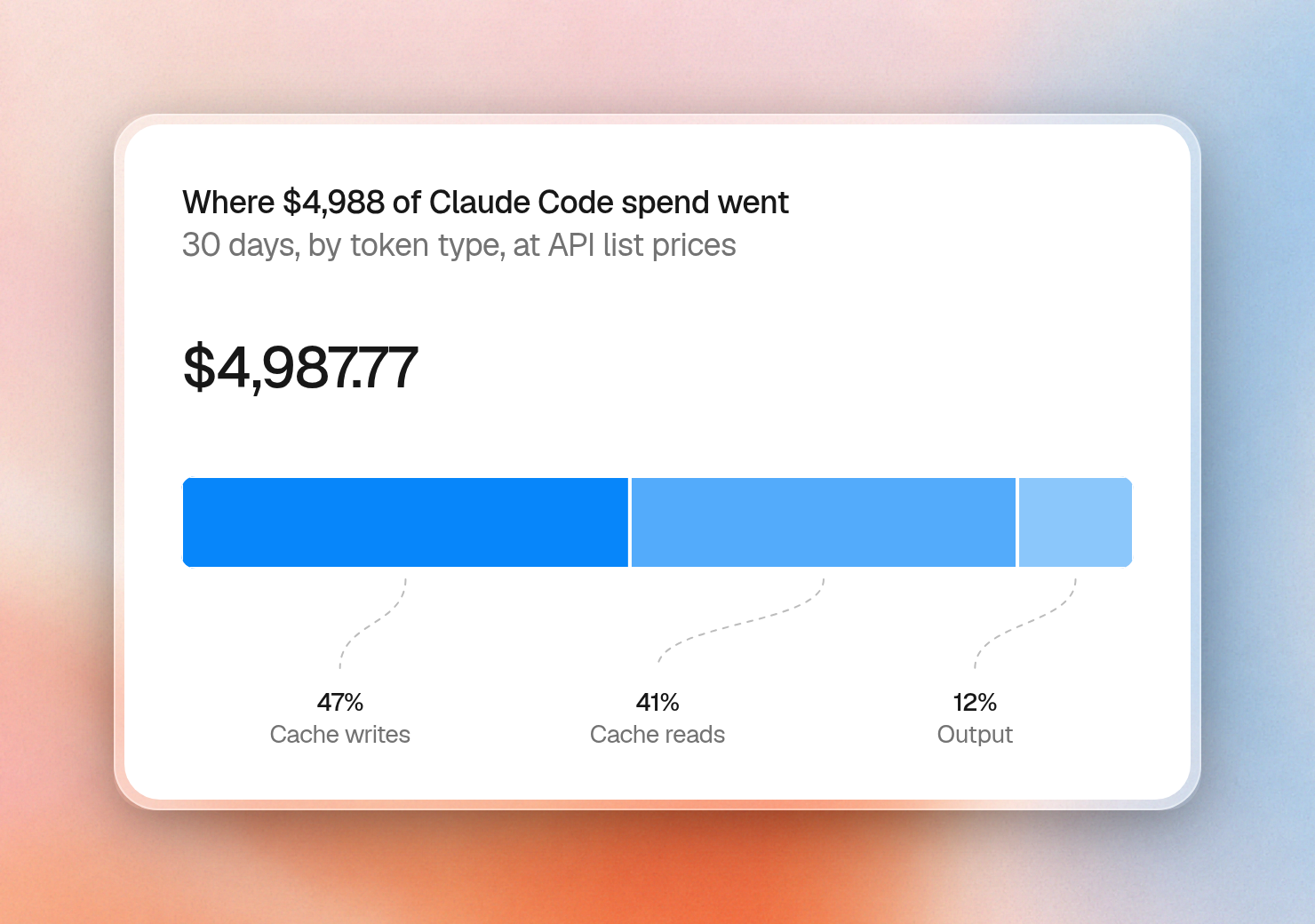
Claude Code sends the whole conversation again on every request. It writes new content to the cache at a higher rate, then reads it back at a much lower rate on later requests.
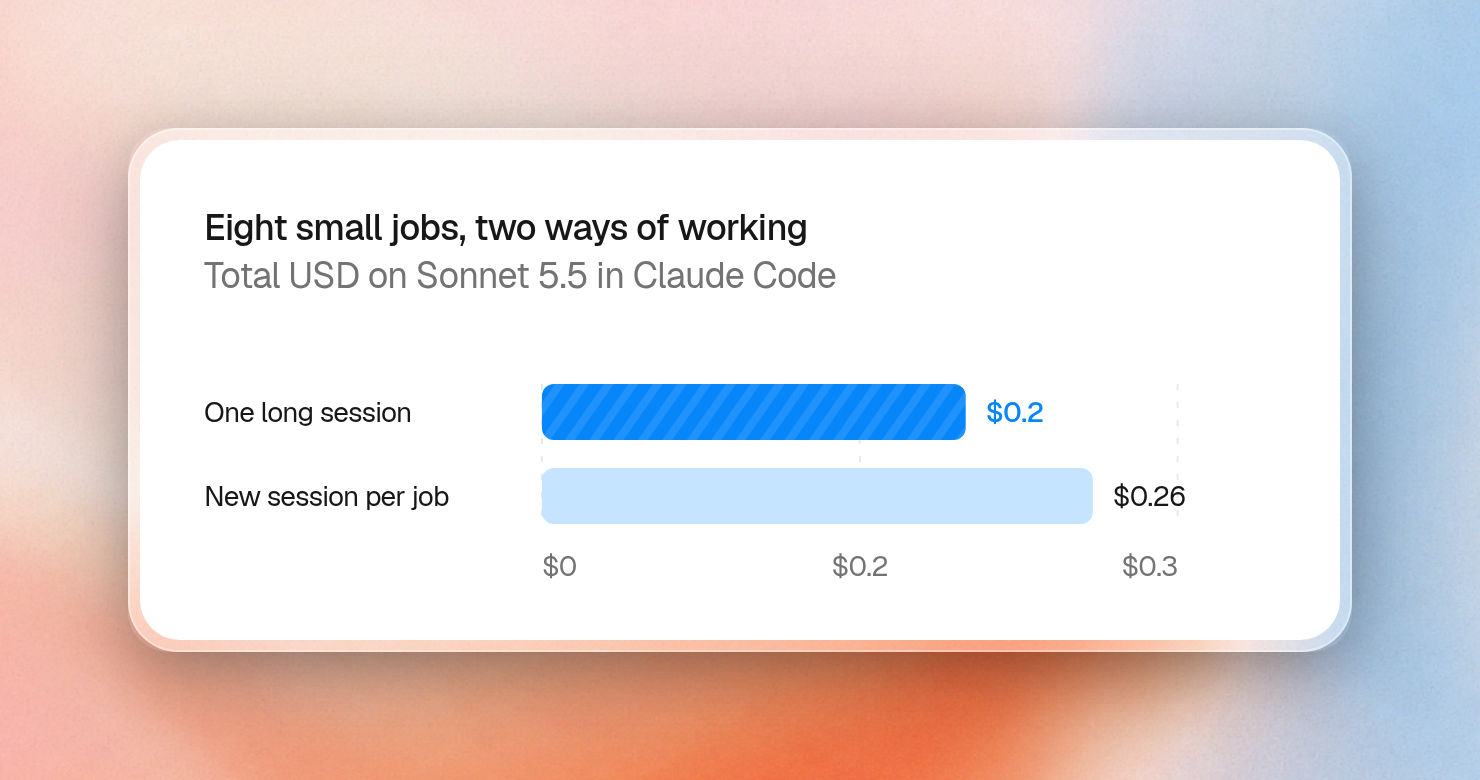
Longer conversations cost more per request. On Opus 5.5, every request in a 500,000-token conversation costs $0.10 in cache reads alone, before Claude writes a single word. You might expect starting a fresh session for each task to help, but it really doesn't: starting over means paying to rebuild the cache each time. Clearing helps mainly when a conversation has grown large and the next task doesn’t need it.
Pausing a conversation is the expensive part. The cache expires after five minutes on the API or with usage credits, and after an hour within a subscription’s usage. Once it expires, the next message needs to rebuild the cache from scratch. We sent the same one-word message to a mid-sized session twice. Sent right away, it cost $0.004. If we let the cache expire, it cost $0.093, which is 21 times as much for the same reply.
The longer the conversation, the larger the cost difference:
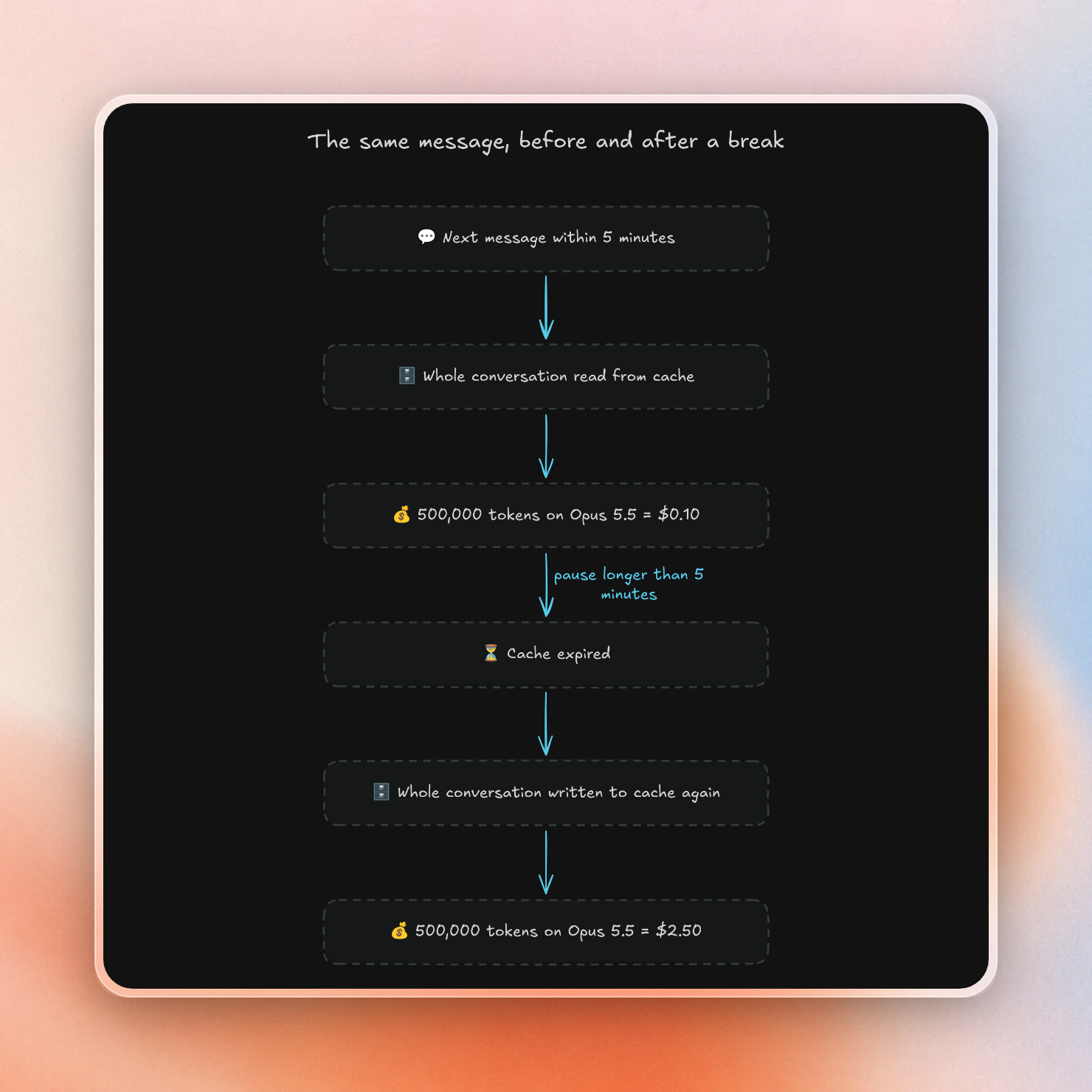
For API users who often step away from long sessions, an admin can extend the cache to one hour by setting promptCacheTtl to 1h. Writing to the cache then costs more ($8 instead of $5 per million tokens on Opus 5.5), so it’s only worth it for people who regularly leave sessions idle.
How do you limit Claude Code spend per developer?
Every way of purchasing Claude Code lets you set per-developer limits, but the controls are in different places:
| You use | See total spend | Set a limit | See spend per developer |
|---|---|---|---|
| Team or Enterprise | Analytics page | Organization settings > Usage | CSV export from Analytics |
| Claude Console (API) | Cost page | Workspaces page | Claude Code page |
| Bedrock, Google Cloud, Foundry | Your cloud's billing console | Your cloud's budgets, or a gateway | OpenTelemetry or a gateway |
Team and Enterprise plans
Each developer first uses their seat’s allowance. If an admin enables usage credits, they continue at API rates after that, up to the spend limit you set on those credits:
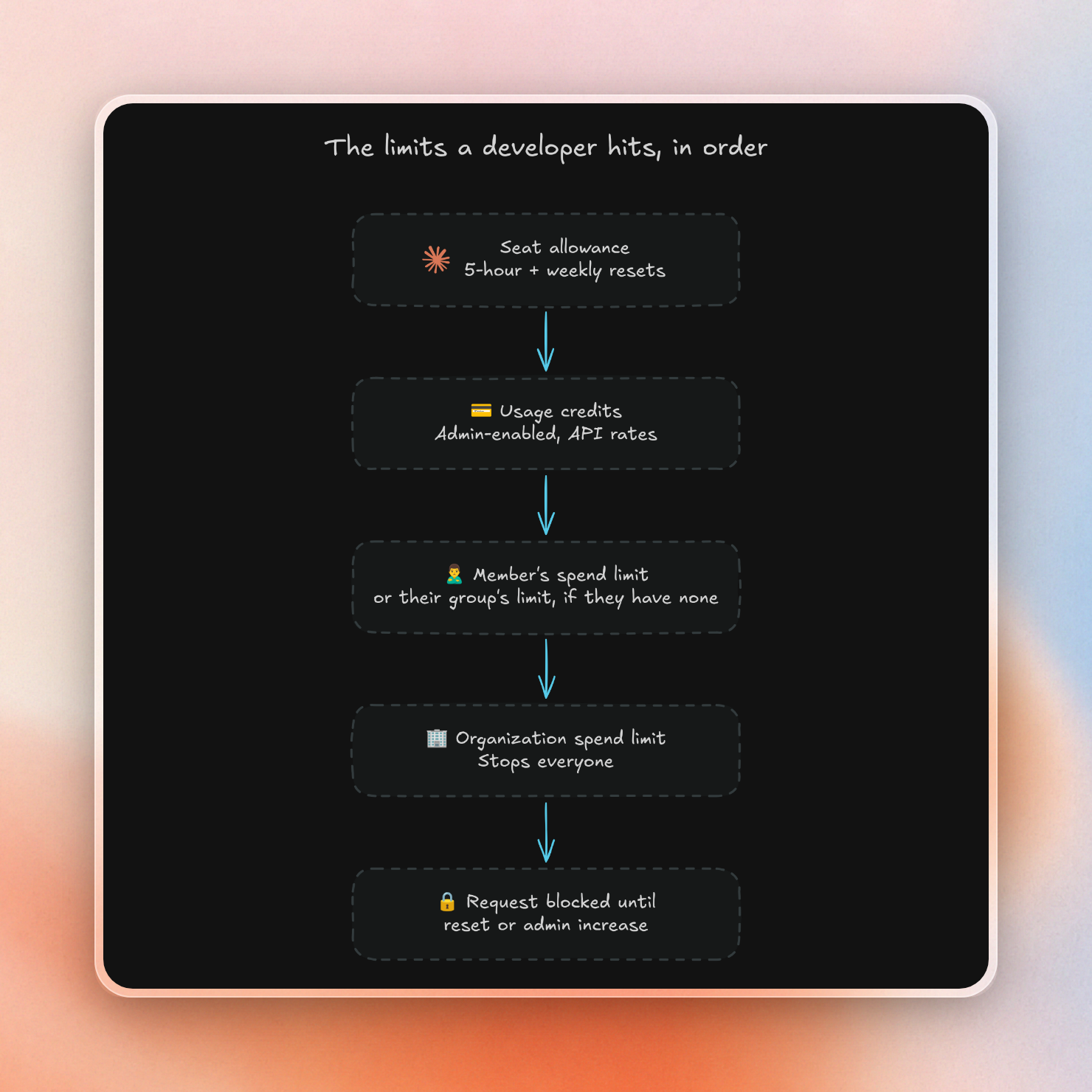
Enterprise plans also offer group limits and pooled budgets (in beta). Be careful here: a member with no individual limit and no group limit has no limit at all. A safe default is a limit per group, with an organization-wide limit as a backstop.
Claude Console (API)
Per-developer limits only work if each developer has their own API key. Developers get one automatically when they sign in to Claude Code with their own Console account. That’s the only workspace that supports per-user monthly spend limits, the Default Workspace doesn’t.
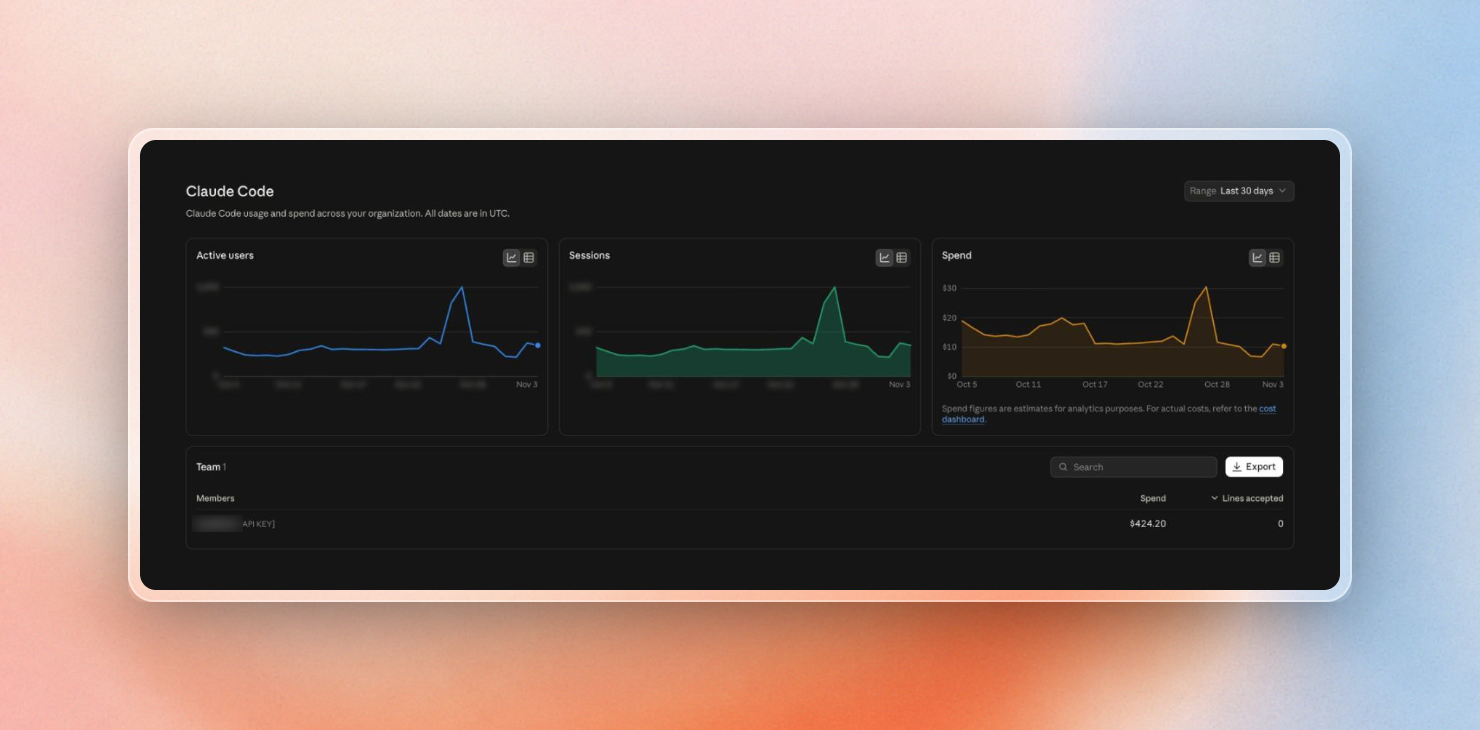
The Claude Code page then shows spend per member. In our example organization, everyone shares a single API key, so sessions and spend are not separated by developer in these charts:
To see what drives cost the most, the Cost page breaks spend down by workspace, API key and model:
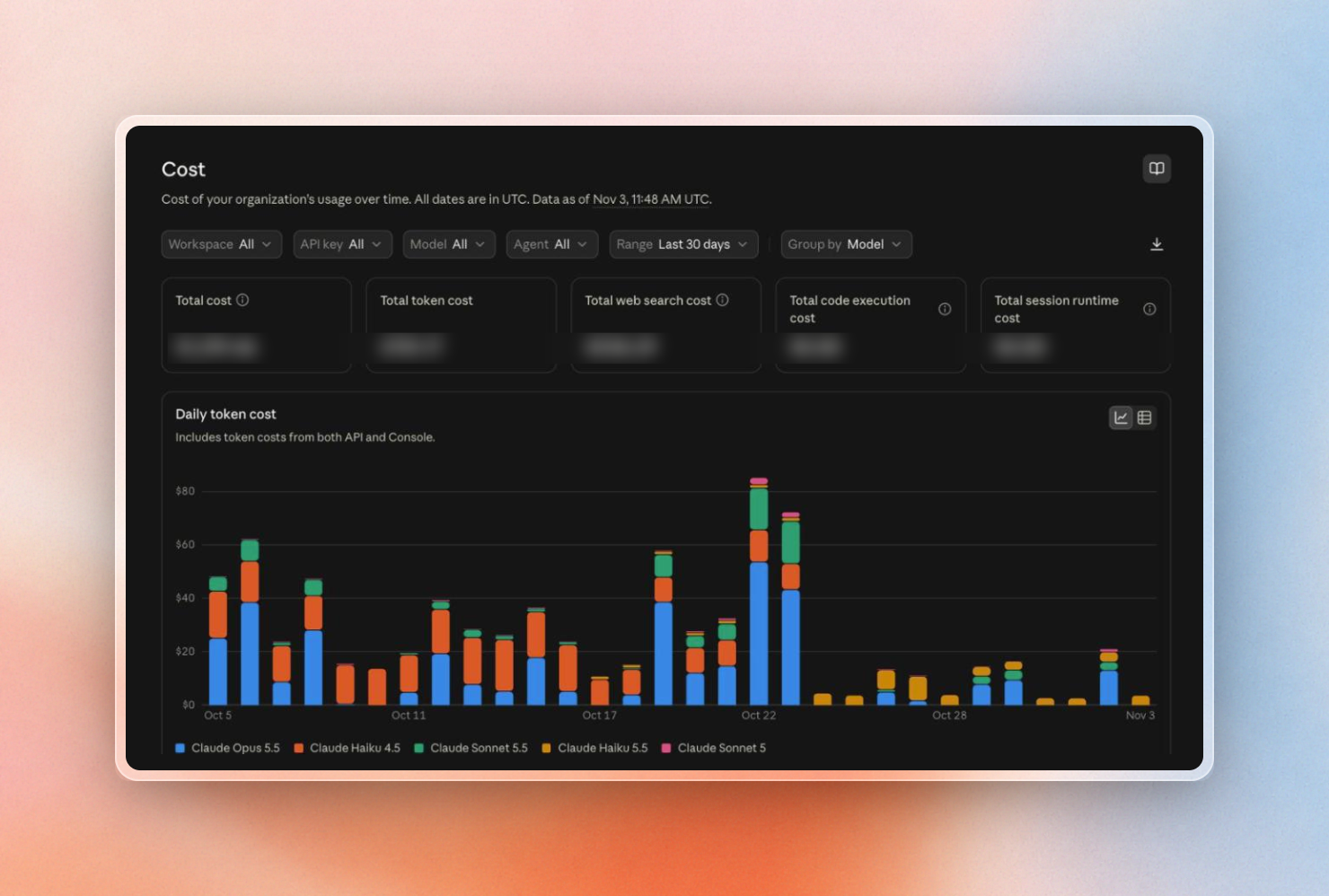
The Console’s Cost page, grouped by model
As a backstop, set an organization-wide limit under Billing. It sends email alerts as spend gets close:
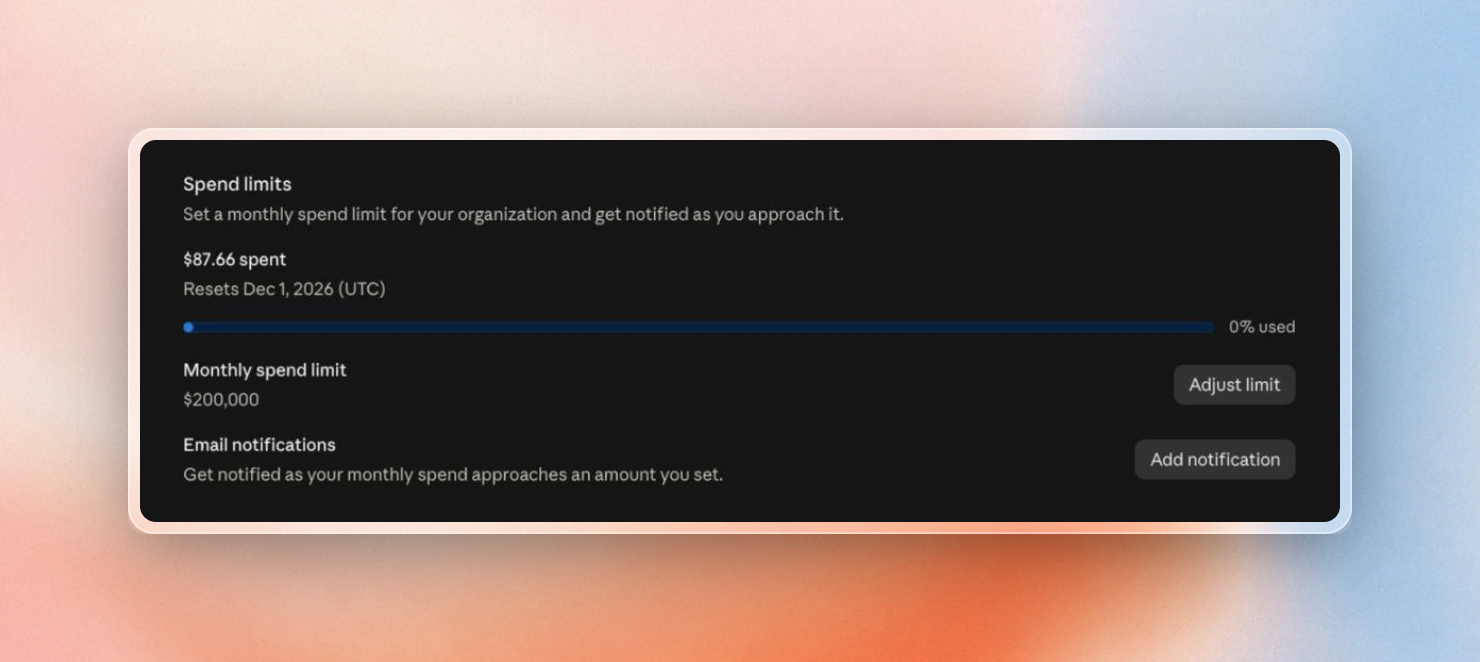
If you're using Bedrock, Google Cloud or Foundry, a Claude apps gateway gives you per-developer limits by day, week or month. It blocks user requests above their limit, and warns the user at 75% and 95%. OpenTelemetry works on every setup and streams per-user tokens and cost into your own monitoring.
What if you want spend limits for multiple providers?
All of the controls above only cover Claude. If your engineers also use Codex, you need a second budget in a second admin console, with its own reports.
For example, ChatGPT Business charges $20 per user per month billed annually, or $25 monthly, and sets monthly credit limits by seat type, with per-user overrides, in OpenAI’s Admin Console. So a $500 limit on Claude and a $500 limit on Codex means $1,000 for that developer, and neither console shows the total. If you wanted to allow access to open-source models or another third agent, you'd need a third console.
On Emdash, your engineers can use any coding agent, like Claude Code or Codex, with any model, and try new ones as they come out. You can bring the subscriptions and spend commitments you already have with Anthropic, OpenAI or your cloud provider, and buy tokens or compute through Emdash if you need more. Either way, all spend controls stay in one place.
You can sign up to get early access on our website.
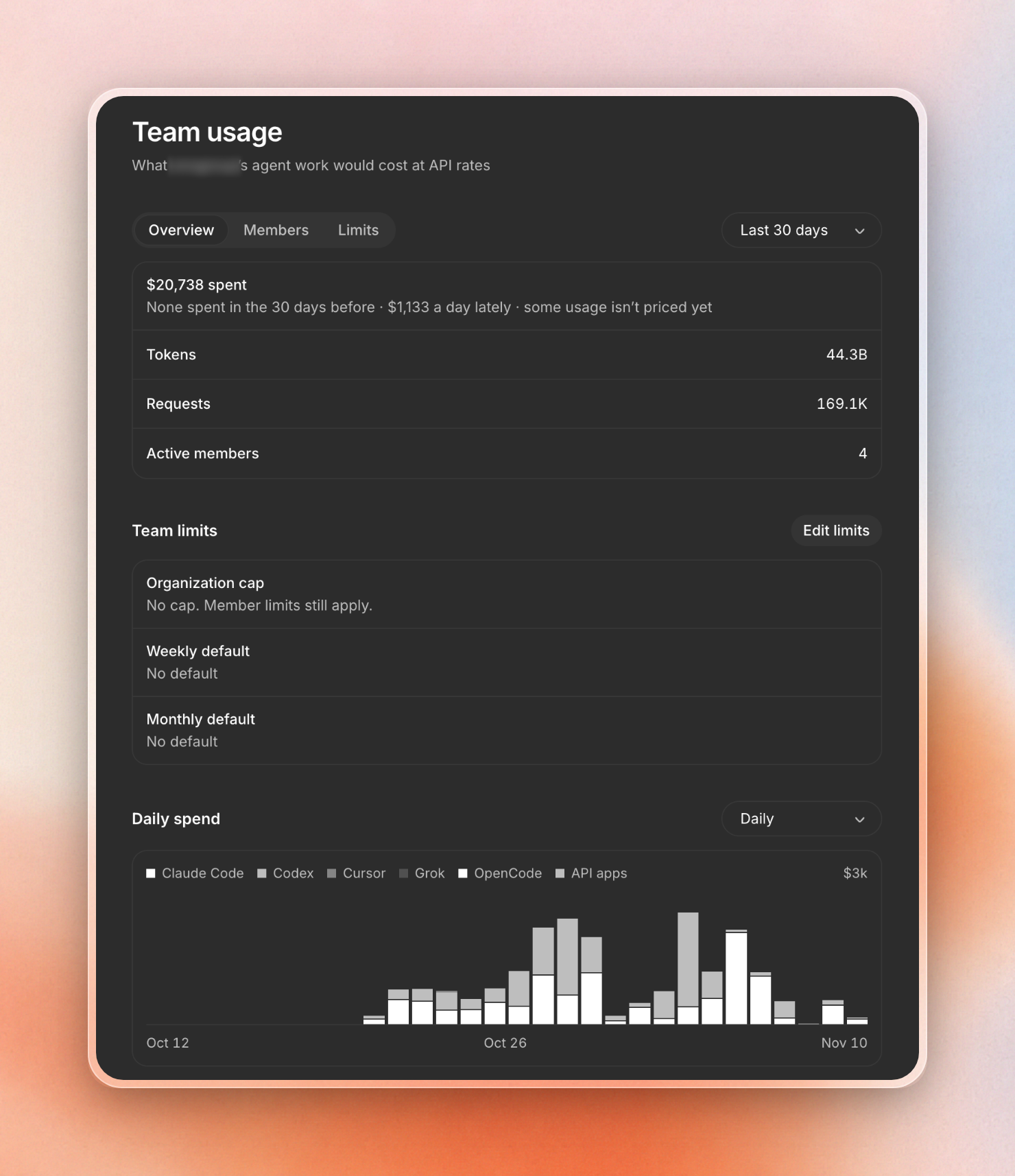
The Team usage page shows what your organization spends by day and cumulatively, split by agent and model:
You can break the same data down by member, and down to individual chats, to find the sessions that drive cost:
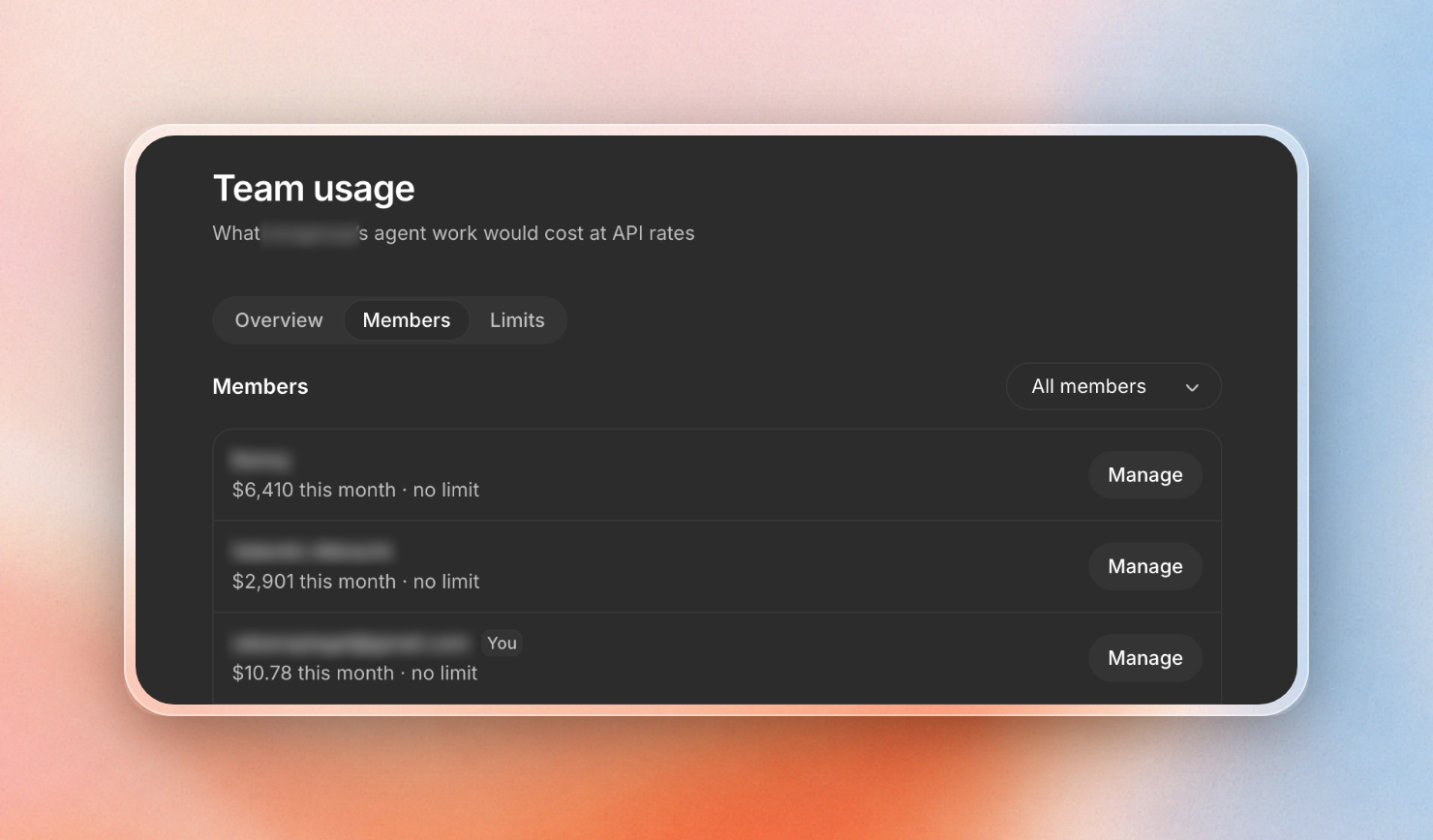
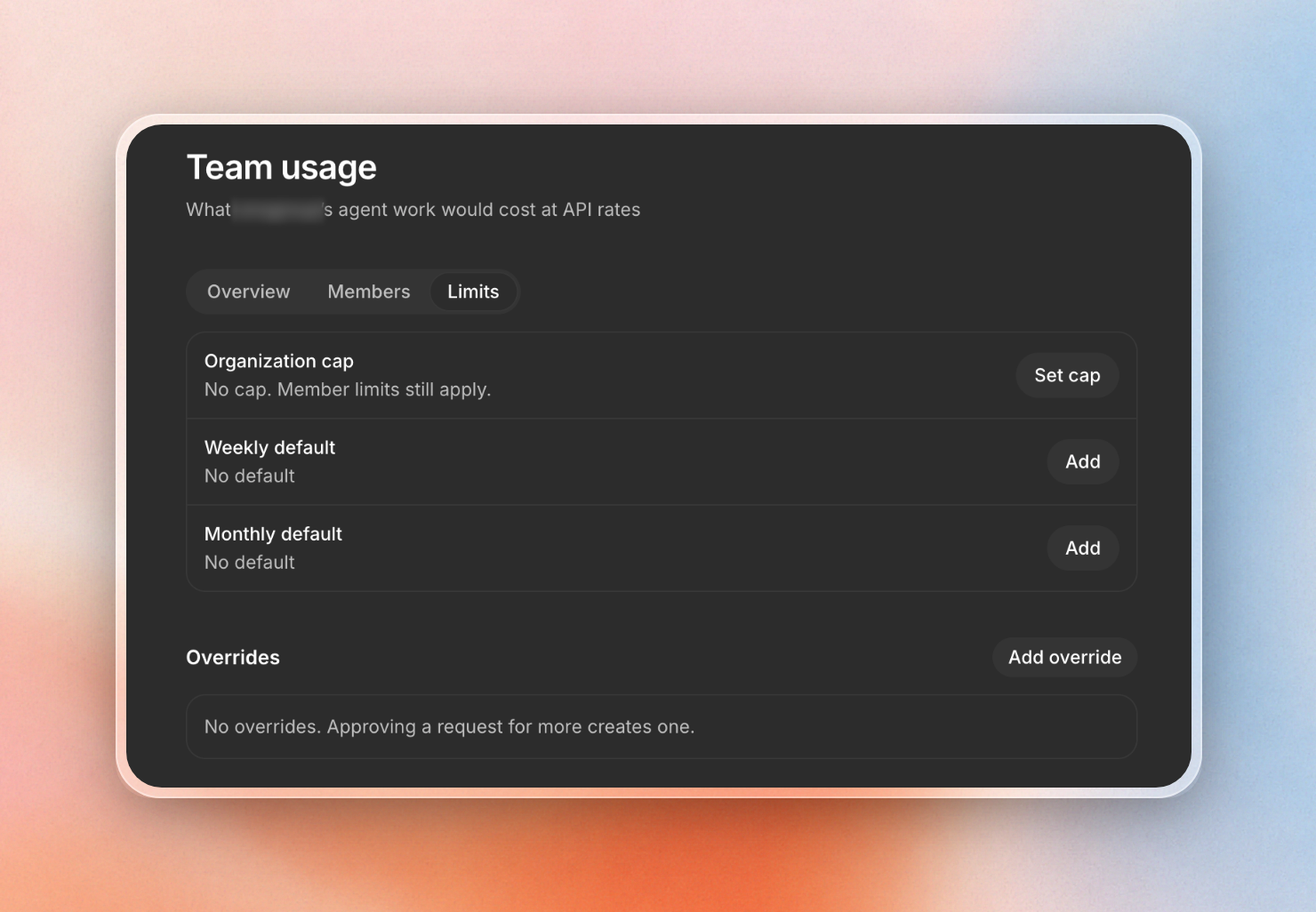
From there, you can set a weekly or monthly limit per developer that applies across all agents. You can also configure exceptions for individual people:
Beyond spend control, admins can approve which MCP servers engineers may use, and set up skills and rules for the whole organization. Agents can run locally on your developers’ devices, in the cloud on your own servers (e.g. on AWS or Hetzner), or in sandboxes hosted by Emdash. Admins add the machines once, and engineers connect to them without setting up servers themselves.
A general guideline about clever Claude usage
- If your team uses Claude daily, I'd recommend Premium Team seats with usage credits on
- Sonnet was half the cost of Opus on our small jobs, with little drop in quality. It might make sense to adjust your default model.
- Check the biggest sessions every month. Five sessions were 43% of my list-price total.
- Do a small pilot to see real spend before you buy for the whole team.
We're building Emdash for engineering teams that use multiple coding agents, such as Claude Code and Codex, and want to stay independent. Sign up for early access.